An AI SRE agent is software that uses a large language model to do parts of a site reliability engineer's work. When an alert fires, it reads the alert, gathers the related logs, metrics, and recent changes, works out a likely cause, and proposes a fix. Where a team has allowed it, the agent can apply that fix itself, inside limits that people set.
You will also see the names SRE agent and AI SRE. Microsoft sells one as Azure SRE Agent, Amazon Web Services (AWS) sells AWS DevOps Agent, and monitoring companies such as Datadog and PagerDuty have built their own. This guide explains what these agents do, how they work, what they cost, and where they go wrong. It assumes no background in AI.
How does an AI SRE agent work?
An AI SRE agent is a large language model connected to tools. A large language model, or LLM, is the kind of AI behind chat assistants: it reads text and writes text. A tool is anything the model is allowed to call, such as a query against your monitoring system, a look at your deployment history, or a command that restarts a service. Many agents connect to tools through the Model Context Protocol (MCP), an open standard for plugging outside systems into an AI model.
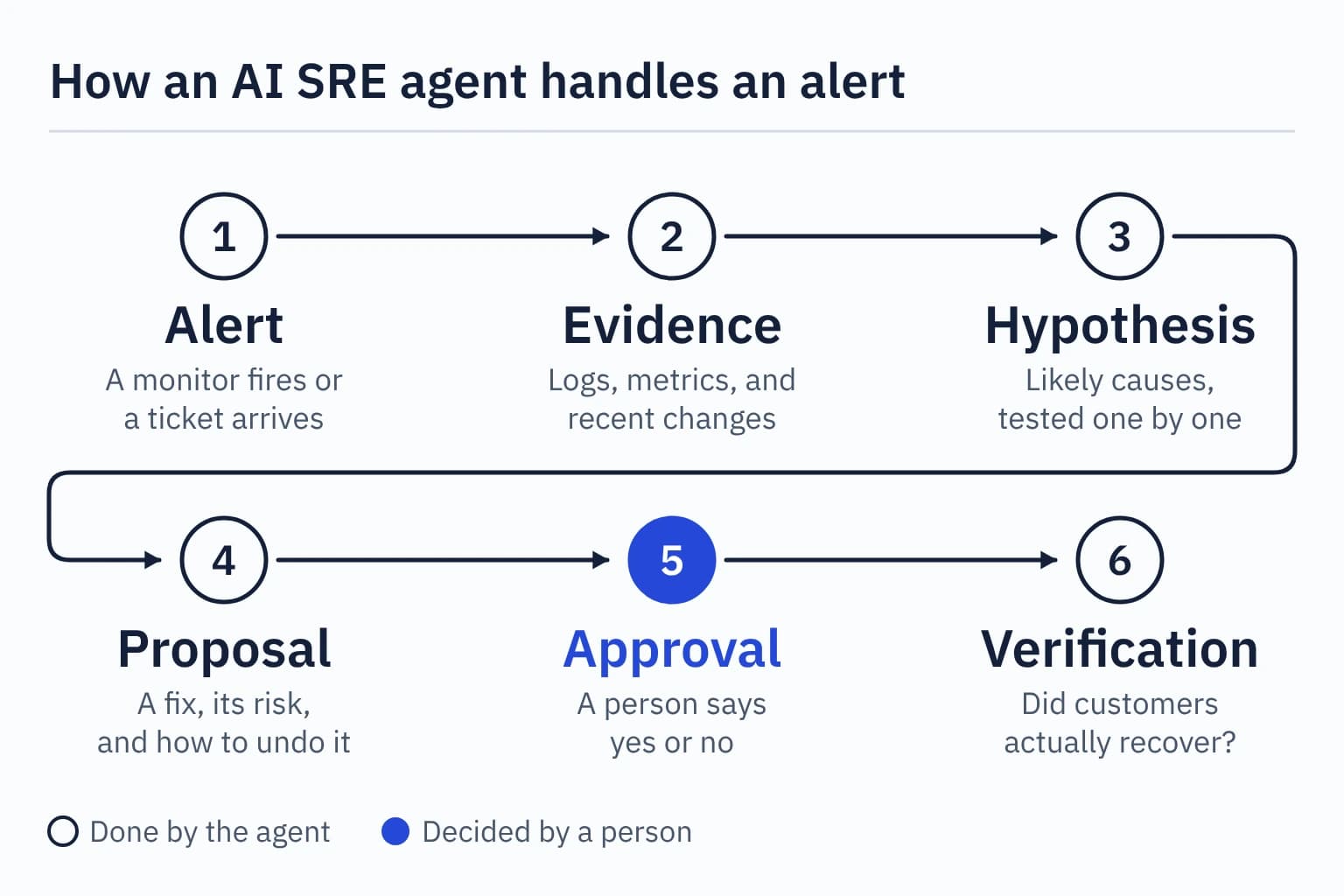
The agent works through a loop of six steps:
- An alert starts the work. A monitor fires, a ticket arrives, or an engineer asks a question. Nobody has to be awake for the investigation to begin.
- It gathers evidence. The agent queries logs, metrics, and traces, checks what changed recently, and reads any runbook written for this alert.
- It forms and tests hypotheses. It lists likely causes and runs further queries to support or reject each one. Datadog's documentation describes its agent as using tools "to validate or invalidate those hypotheses", and says an investigation is marked inconclusive when the data is not enough.
- It proposes a fix. A useful proposal names the action, the risk, and how to undo it.
- A person approves, or the agent acts within set limits. This is the step teams configure most carefully. It is covered in the autonomy section below.
- It verifies and records. The agent checks whether the service recovered, then writes a summary for the incident channel and the incident record.
The difference from a script is step 3. A script runs the steps someone wrote in advance. An agent decides which question to ask next based on what the last answer showed.
What can an AI SRE agent do?
Current agents cover six kinds of work. The examples come from each vendor's own documentation:
- Triage alerts. The agent judges severity and links duplicates. AWS DevOps Agent has a triage step that attaches duplicate tickets to the main investigation.
- Investigate incidents. It correlates telemetry, code, and deployment data to find a probable cause.
- Propose or apply mitigations. Azure SRE Agent "suggests or, when configured, executes mitigations", such as restarting a pod or adjusting a scaling threshold.
- Write the paperwork. Agents draft incident tickets, status updates, handover notes, and postmortem drafts from what they found.
- Suggest prevention. AWS DevOps Agent analyses past incidents and recommends changes to monitoring, infrastructure, and deployment pipelines.
- Run routine checks. Azure SRE Agent can run scheduled health checks and cleanup tasks and post the results to a team channel.
What does an AI SRE investigation look like?
Here is one fictional incident at TicketDesk, the ticket-booking company used throughout this site. A deployment breaks the workers that send booking confirmations. The agent runs in a mode that asks a person before changing production.
| Time | What happens | Who |
|---|---|---|
| 01:57 | A deployment changes the software image used by the confirmation workers. | Release pipeline |
| 01:58 | The workers start crashing as they launch. Bookings and payments still succeed, but no confirmations go out. | System |
| 02:10 | An alert fires: the oldest unsent confirmation is 12 minutes old, against a target of 2. The agent starts investigating. | Agent |
| 02:12 | Evidence: all six workers have restarted repeatedly since 01:58, the 01:57 deployment changed their image, and the start-up log reports a missing setting. Payment and reservation records are still being saved. | Agent |
| 02:13 | Two explanations are tested. An email-provider outage does not fit, because the workers fail before they try to send. The new image fits: the previous image ran with the same settings until 01:57. | Agent |
| 02:14 | Proposal: roll the workers back to the previous image. Stored bookings are not touched, and the rollback can be reversed. | Agent |
| 02:16 | The on-call engineer, paged by the same alert, reads the evidence and approves. | Person |
| 02:17 | The rollback runs and the workers start cleanly. | Agent |
| 02:22 | The backlog has cleared. The agent checks that every paid booking since 01:58 has exactly one confirmation. | Agent |
| 02:25 | A summary is posted and an incident record drafted. The engineer adds a follow-up: the release pipeline should have caught the missing setting. | Agent, then person |
The backlog arithmetic is simple enough to check. Bookings arrive at 30 a minute overnight, so 19 minutes without workers leaves about 570 confirmations waiting. Healthy workers send 150 a minute, which clears the queue at a net 120 a minute, or just under five minutes.
The engineer woke up to a diagnosis and a proposal, where they would otherwise have started from a blank dashboard. They still made the decision, and they still own the follow-up. A real incident is rarely this tidy. Evidence goes missing, two causes overlap, and the agent's first explanation can be wrong. The investigation lesson shows how to test a hypothesis yourself, which is the skill you need to check an agent's work.
How is an AI SRE agent different from runbook automation and AIOps?
Runbook automation repeats steps that a person wrote, AIOps spots unusual patterns in operations data, and an AI SRE agent plans its own investigation. AIOps is short for artificial intelligence for IT operations, an older term for using statistics and machine learning on monitoring data.
| Approach | What it does | Where it falls short |
|---|---|---|
| Runbook automation | Runs fixed steps that someone wrote in advance, the same way every time | Cannot handle a situation nobody scripted |
| AIOps | Uses statistics and machine learning to spot anomalies and group related alerts | Flags that something is unusual without explaining it or fixing it |
| AI SRE agent | Plans its own investigation, queries your tools, and writes a diagnosis with a proposed fix | Can be confidently wrong, and needs limits on what it may change |
The three work together in practice. An agent often starts from an alert that AIOps grouped, and it may finish by running a runbook that a person wrote and approved. Our toil and automation lesson explains how to decide which repeated work is worth automating at all.
Which AI SRE agents can you use in 2026?
The two largest cloud providers both made their agents generally available in March 2026, and most monitoring vendors now ship one. This table records what each maker's own documentation said in October 2026.
| Agent | What its documentation says |
|---|---|
| Azure SRE Agent (Microsoft) | Generally available since March 2026. Investigates incidents across Azure resources, connected monitoring tools, and code repositories. Review mode asks a person before infrastructure changes. Autonomous mode acts and then reports. |
| AWS DevOps Agent (Amazon Web Services) | Generally available since March 31, 2026. Investigates incidents across AWS, other clouds, and on-premises systems, and recommends fixes and prevention. Read-only on customer AWS resources, and proposed actions need explicit human approval. |
| Bits AI SRE (Datadog) | Investigates monitor alerts by forming hypotheses and testing them against telemetry. Suggests fixes and can open code pull requests. One-click infrastructure actions are in preview. |
| SRE Agent (PagerDuty) | Described as a virtual responder. Triages an incident, gathers context, and recommends a workflow that the responder reviews and runs. |
| HolmesGPT (open source) | A troubleshooting agent for Kubernetes and cloud-native systems. Accepted as a Cloud Native Computing Foundation Sandbox project in October 2025. Runs with a language model you choose. |
Sources: Microsoft's overview and run modes, AWS's user guide and AI service card, Datadog's investigation and action pages, PagerDuty's August 2026 update, and the CNCF introduction to HolmesGPT, all read on October 11, 2026.
Start-ups such as Resolve AI, Cleric, and Traversal sell dedicated agents too. Google runs its own internally and calls it SRE AI. Features in this market change every month, so read the current documentation before you compare products. For the two cloud providers' agents side by side, see Azure SRE Agent vs AWS DevOps Agent.
How much autonomy should an AI SRE agent have?
Give the agent the lowest level of authority that is still useful, and raise it only when its record supports the change. Most teams start with an agent that reads and recommends, then allow specific, reversible actions once they have seen it get those right many times.
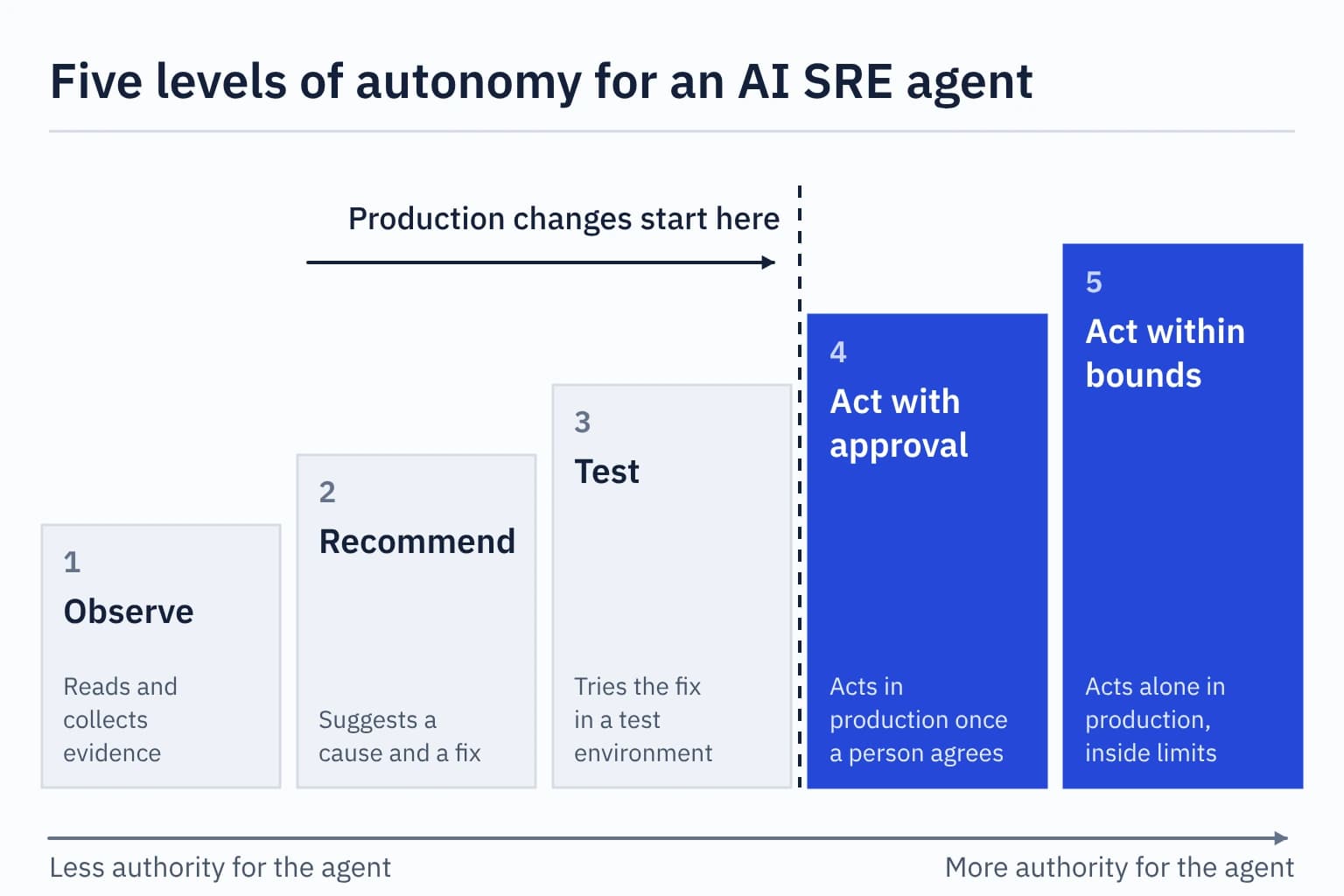
The vendors' defaults point the same way. Microsoft's guidance for Azure SRE Agent is to start in Review mode, watch what the agent recommends for two to four weeks, and switch a trigger to Autonomous only when you find a pattern you consistently approve. AWS sets a stricter default: its agent is read-only on customer AWS resources, and AWS says a proposed remediation needs explicit human approval before it runs.
Whatever the level, write down four things before the agent goes near production: what it may read, what it may change, when it must stop, and how a person takes over. Will AI replace SREs? walks through the five levels with a worked rollback decision.
What can go wrong with an AI SRE agent?
An AI SRE agent can give a confident answer that is wrong, and it can act on that answer if you let it. The vendors say so themselves. These are the risks to plan for:
- It can be fluently wrong. AWS's service card says its agent "depends on large language models (LLMs) which can produce inaccurate content" and gives no confidence score. Check the evidence it cites, the way you would check a colleague's theory.
- It only sees what you connect. If a system is outside the agent's access, the agent does not know it exists. AWS warns this "may result in incomplete or incorrect root cause analyses".
- Approval gates may not cover everything. In Azure SRE Agent's Review mode, the Approve and Deny buttons appear for Azure infrastructure operations. Actions such as sending an email or posting to a chat channel go ahead without them unless you add further rules.
- Vendor results are not your results. AWS reports that preview customers and partners saw up to 75% lower time to resolve incidents. That is a vendor-reported figure from selected users. Measure your own false positives, wrong diagnoses, and time saved.
- The bill has a fixed part. Azure charges an always-on fee for every agent that exists, including one you have stopped.
- People can lose practice. If the agent handles every routine incident, newer engineers get fewer chances to learn. Review its investigations as a team and keep running on-call practice.
How much does an AI SRE agent cost?
The cloud providers bill by usage, and the two models differ. Prices here were read on October 11, 2026.
AWS DevOps Agent costs $0.0083 for each second the agent works, which is $29.88 an hour, with no charge while it is idle. An eight-minute investigation therefore costs about $3.98. AWS's own example prices ten such investigations a month at $39.84. New customers get a two-month trial.
Azure SRE Agent is billed in Azure Agent Units (AAUs). Each agent costs 4 AAUs an hour for as long as it exists, which is about 2,920 AAUs in a 730-hour month, plus a variable amount for the work it does. Microsoft's examples put one incident investigation at roughly 12 to 35 AAUs depending on the model. Azure's pricing page showed $0.10 per AAU in US dollars on that date, so the always-on fee is about $292 a month for one agent and an investigation costs roughly $1.20 to $3.50. The page lets you choose a region and a currency. New customers can run up to three agents for 30 days without the always-on fee.
Both providers also charge separately for the monitoring queries the agent runs. The comparison of the two agents works through a month's bill at different volumes.
How do you evaluate an AI SRE agent?
Test the agent on incidents you have already solved before you trust it with a live one. Give it read-only access, replay a few past incidents, and compare its conclusions with what your team found. Then ask these questions:
- What can it read, and which systems are invisible to it?
- What can it change, and which changes need a named person's approval?
- Does every conclusion link to the evidence behind it?
- What does it do when it is not sure?
- Can you see a full record of its proposals, approvals, and actions?
- How is it billed when it is idle and when it is busy?
- Is your data used to train models? Microsoft and AWS both say no for these two products.
- How will you measure wrong diagnoses, false alarms, and time saved?
Will AI SRE agents replace SREs?
No, on the evidence available in October 2026. Agents take over the first pass of an investigation and some narrow, reversible fixes. People still decide what reliable means for customers, how much risk a change is worth, and what to do when a failure looks like nothing seen before. Will AI replace SREs? covers the evidence and the skills worth building. If you are new to the role itself, start with what SRE is or the full SRE 101 track.
Exercise: decide what the agent may do alone
TicketDesk wants its agent to act without waiting for a person on some alerts. Sort these three actions into act alone, act with approval, or recommend only. Work out your own answer first, then compare your reasoning with this one:
- Restart one web instance that is failing its health check.
- Roll back a release that raised the error rate.
- Repair booking records after a bug charged some customers twice.
The restart is a candidate for acting alone. It is small, reversible, well understood, and easy to verify. It still needs limits: one instance at a time, and stop if several fail together, because that points to a wider problem.
The rollback needs approval. It affects every customer, and stored records may have changed since the release. A person should confirm that going back is safe. The safe releases lesson explains why.
The record repair is recommend only. It touches customers' money and bookings, and a mistake is hard to undo. The agent can find the affected records and draft a plan. A person decides and carries it out.
Quick answers
Is an SRE agent the same as an AI SRE?
Usually, yes. Both names describe an AI agent that does site reliability work. "AI SRE" also appears in job listings for engineers who keep AI systems reliable, so check which meaning a page intends.
What is Azure SRE Agent?
Azure SRE Agent is Microsoft's AI agent for investigating incidents and automating routine operations on Azure. It connects to Azure resources, monitoring tools, incident platforms, and code repositories, and it either proposes fixes for approval or applies them, depending on the run mode you choose.
What is AWS DevOps Agent?
AWS DevOps Agent is Amazon Web Services' AI agent for incident investigation and prevention. It starts investigating when an alert or ticket arrives, works across AWS, other clouds, and on-premises systems, and recommends fixes that a person reviews.
Is there an open-source AI SRE agent?
Yes. HolmesGPT is an open-source troubleshooting agent for Kubernetes and cloud-native systems, and it has been a Cloud Native Computing Foundation Sandbox project since October 2025.
Does an AI SRE agent need write access to production?
No. An agent is useful with read-only access to your monitoring data, deployment history, and code. Write access is a separate decision, and you can withhold it. AWS's agent is read-only on customer AWS resources by default.