Azure SRE Agent can apply a fix itself once you allow it, while AWS DevOps Agent investigates and recommends but stays read-only on your AWS resources. That is the biggest difference between the two. The second is the bill: Azure charges a fixed hourly fee for every agent plus a usage fee, and AWS charges only for the seconds its agent spends working.
Both are AI agents that investigate incidents for site reliability and operations teams, and both became generally available in March 2026. This comparison uses each vendor's own documentation and pricing pages as read on October 11, 2026. If the idea of an AI agent doing reliability work is new to you, start with what an AI SRE agent is.
Azure SRE Agent vs AWS DevOps Agent at a glance
| Area | Azure SRE Agent | AWS DevOps Agent |
|---|---|---|
| Maker and launch | Microsoft. Generally available since March 2026. | Amazon Web Services. Generally available since March 31, 2026. |
| Home ground | Azure resources | AWS accounts, plus Azure and on-premises systems |
| Changes to production | Yes. It asks first in Review mode and acts alone in Autonomous mode. | No by default. It is read-only on your AWS resources and a person approves any proposed fix. |
| Monitoring tools | Azure Monitor, Application Insights, Log Analytics, Datadog, Dynatrace, Elasticsearch, New Relic, Splunk | Amazon CloudWatch, Datadog, Dynatrace, Grafana, New Relic, Splunk |
| Code and delivery | GitHub, Azure DevOps | GitHub, GitLab, Azure DevOps |
| Incidents and chat | Azure Monitor alerts, PagerDuty, ServiceNow, Microsoft Teams, Outlook | PagerDuty, ServiceNow, Slack |
| Custom tools | Model Context Protocol (MCP) servers, custom agents, skills | MCP servers, custom agents, skills, and outside agents over the A2A protocol |
| Billing | A fixed fee for every hour an agent exists, plus usage | $0.0083 for each second of work, nothing while idle |
| Free trial | Up to three agents for 30 days each without the fixed fee | Two months with a monthly allowance of hours |
Sources: Microsoft's overview, connectors, run modes, and pricing pages. AWS's user guide, launch announcement, AI service card, and pricing page.
What is Azure SRE Agent?
Azure SRE Agent is Microsoft's AI agent for investigating incidents and automating routine operations on Azure. Microsoft describes it as a service that connects to your Azure resources, monitoring tools, incident platforms, and code repositories, then "gathers context, identifies probable causes, and suggests or, when configured, executes mitigations".
It reads Azure Monitor, Application Insights, and Log Analytics without extra setup, because it uses an Azure identity with the permissions you grant. It can also run scheduled work such as daily health checks, and it keeps a memory of past investigations so that a new on-call engineer starts with what the team already learned.
What is AWS DevOps Agent?
AWS DevOps Agent is Amazon Web Services' AI agent for incident investigation and prevention. It starts investigating when an alert or a support ticket arrives, "correlating telemetry, code, and deployment data to identify root cause". It also studies past incidents and recommends changes that would stop them from recurring.
You set it up through Agent Spaces. An Agent Space is a container that defines which AWS accounts, tools, and permissions one agent may use. The agent builds a map of your application's resources and how they relate, and it uses that map during an investigation. Since general availability it also supports Azure and on-premises systems, so it is not limited to AWS.
Which agent can change production?
Azure SRE Agent can change production and AWS DevOps Agent, by default, cannot. This is the difference to settle before any other, because it decides how much you are trusting the agent.
Azure SRE Agent has two run modes. In Review mode the agent investigates, proposes an action, and waits. Only a person with the SRE Agent Administrator role can approve it. In Autonomous mode the agent "investigates and executes actions without waiting for approval". Microsoft recommends starting in Review mode, watching the agent for two to four weeks, and then switching only the triggers you consistently approve.
Two details in Microsoft's documentation deserve attention:
- The Approve and Deny buttons in Review mode cover Azure infrastructure operations. Sending an email, posting to Teams, or querying another system proceeds without them unless you add rules of your own.
- The agent as a whole defaults to Review, but Microsoft's table lists Autonomous as the default for response plans and scheduled tasks. Check the setting on each one you create.
AWS DevOps Agent takes the stricter position. AWS's service card, current as of September 30, 2026, says the agent "operates in a read-only mode with respect to customer AWS resources" and is "not designed to autonomously execute remediation actions that modify production infrastructure without human review and approval". It writes a mitigation plan, and a person or another approved tool carries it out.
Neither design is better in every case. An agent that can act saves time on routine, reversible fixes, the kind of repeated work worth automating. An agent that cannot act is easier to trust on day one. Will AI replace SREs? explains how to raise an agent's authority in steps.
What does each agent connect to?
Each agent works best in its own cloud and reaches other systems through connectors. The table at the top lists the named integrations. Three differences matter in practice:
- Other clouds. AWS DevOps Agent supports Azure, and on-premises systems through MCP. Microsoft's connector documentation names no built-in connector for AWS or Google Cloud, so reaching those from Azure SRE Agent means supplying an MCP server yourself.
- Chat tools. Azure SRE Agent posts to Microsoft Teams and Outlook. AWS DevOps Agent posts to Slack. Both work with PagerDuty and ServiceNow.
- Being called by other tools. AWS DevOps Agent can act as a server that coding assistants and other agents call through MCP or the Agent2Agent (A2A) protocol. That lets a developer ask it for an investigation from inside another tool.
MCP is the Model Context Protocol, an open standard for connecting outside systems to an AI model. If a tool you rely on has an MCP server, both agents can probably use it.
How is each agent priced?
Azure SRE Agent has a fixed part and a usage part. AWS DevOps Agent has only a usage part. The diagram shows the shape of each bill across one day.
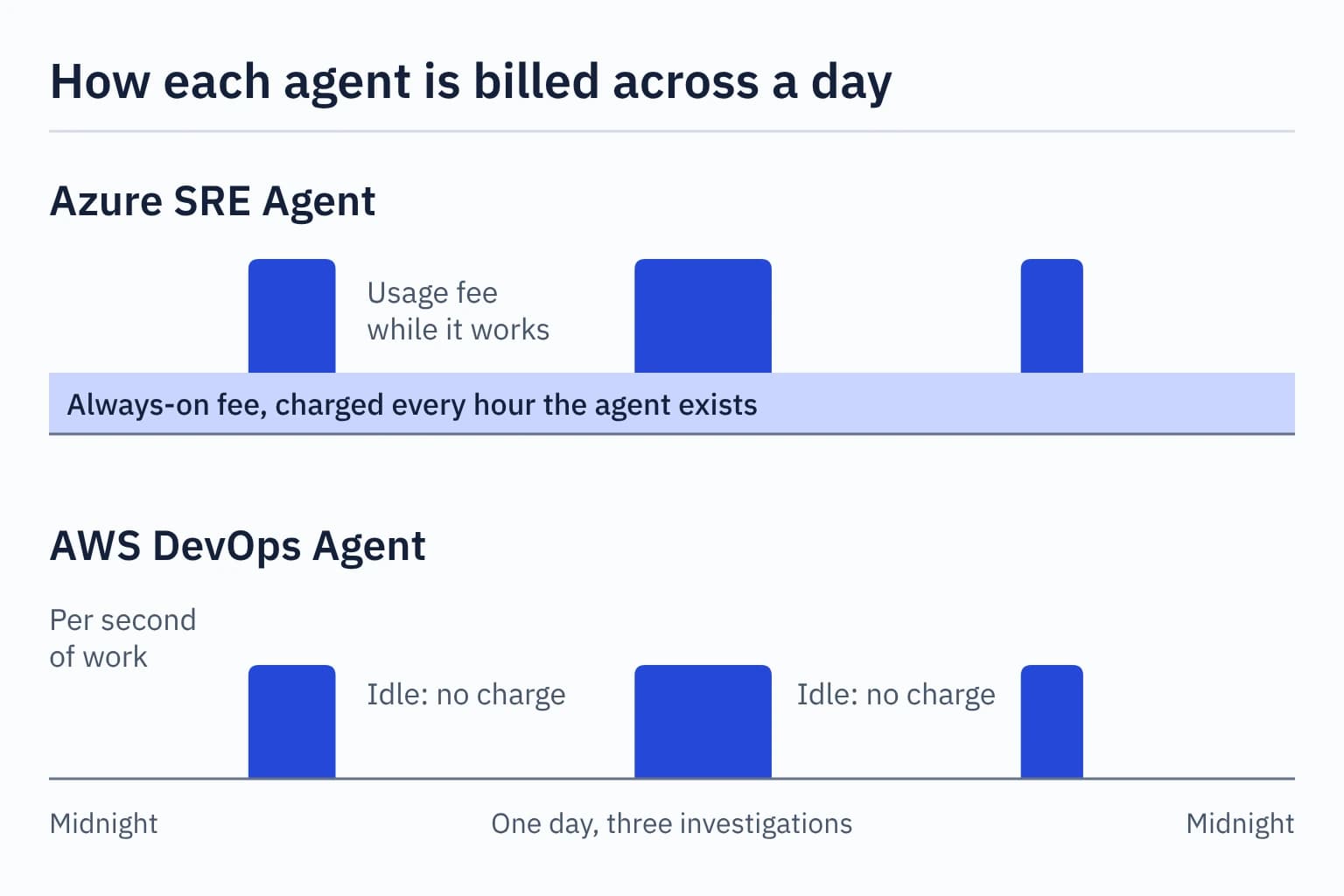
Azure SRE Agent is billed in Azure Agent Units (AAUs):
- Always-on: 4 AAUs for every hour each agent exists, which is about 2,920 AAUs in a 730-hour month. A stopped agent still pays this. Only deleting the agent ends it.
- Active flow: a variable amount based on the AI model's token use while the agent works. Microsoft's examples put a quick question at about 1 to 4 AAUs, an incident investigation at about 12 to 35, and a full remediation at about 30 to 87, depending on the model you choose.
Azure's pricing page showed $0.10 per AAU in US dollars when read on October 11, 2026. That makes the always-on fee $0.40 an hour, or about $292 a month for one agent. The page lets you choose a region and a currency, so check the price for yours.
AWS DevOps Agent is billed by time:
- Rate: $0.0083 for each second the agent works, which is $29.88 an hour. The same rate applies to investigations, prevention evaluations, and on-demand tasks.
- Idle time: no charge.
- Support credits: customers on AWS Business Support+, Enterprise Support, or Unified Operations receive monthly agent credits worth 30%, 75%, or 100% of the previous month's support charge.
Both vendors bill separately for the monitoring queries the agent runs, such as log searches.
What would a month cost?
AWS is cheaper at low volume and Azure can become cheaper at high volume, because Azure's fixed fee is spread across more work. Here is the arithmetic for one team, using each vendor's own example of an investigation.
The assumptions: one Azure agent, AWS investigations that last eight minutes (the length AWS uses in its pricing examples), Azure investigations that use 11.7 AAUs on the lower-cost model or 35.3 AAUs on the higher-cost one (Microsoft's examples), and Azure's listed price of $0.10 per AAU.
AWS, 40 investigations
40 x 480 s x $0.0083 = $159.36

Azure, 40 investigations
Always-on         2,920 AAUs

Lower-cost model
40 x 11.7 =         468 AAUs
Total             3,388 AAUs
At $0.10 each       $338.80

Higher-cost model
40 x 35.3 =       1,412 AAUs
Total             4,332 AAUs
At $0.10 each       $433.20
The same sums at other volumes:
| Investigations a month | AWS DevOps Agent | Azure SRE Agent, lower-cost to higher-cost model |
|---|---|---|
| 10 | $39.84 | $303.70 to $327.30 |
| 40 | $159.36 | $338.80 to $433.20 |
| 100 | $398.40 | $409.00 to $645.00 |
| 400 | $1,593.60 | $760.00 to $1,704.00 |
Under these assumptions Azure's lower-cost model overtakes AWS at a little over 100 investigations a month. Its higher-cost model does so only above about 640.
This is a comparison of pricing models, and it is not a benchmark. An eight-minute AWS investigation and a 12-AAU Azure investigation are each vendor's own example, and nobody has shown they do the same amount of work. Run both trials on your own incidents and compare the real bills.
Where is each agent available?
Both agents can investigate resources in any region of their own cloud. What differs is where the agent itself can be created, which decides where its data is stored.
- Azure SRE Agent: Microsoft's FAQ, updated in June 2026, lists Sweden Central, East US 2, and Australia East. The agent stores its data in the region where you deploy it.
- AWS DevOps Agent: eleven regions. They are N. Virginia, Oregon, Canada (Central), São Paulo, Mumbai, Singapore, Sydney, Tokyo, Frankfurt, Ireland, and London. An Agent Space and its data are stored in the region where you create it.
Region lists change often. Check the current list if you have a data residency requirement, which is a rule about the country or region where your data must be kept.
How do they handle access and data?
Both agents work inside the permission system of their own cloud, and both vendors say they do not use your data to train AI models.
Azure SRE Agent acts through an Azure managed identity with the role-based permissions you assign. People get one of four roles on the agent itself: Administrator, Standard User, Reader, or Author. Only an Administrator can approve an action. Microsoft notes that being an Owner or Contributor on the Azure subscription does not replace these roles.
AWS DevOps Agent acts through the IAM role attached to each Agent Space. Anything outside that role is invisible to it. AWS warns that this "may result in incomplete or incorrect root cause analyses", so scope each Agent Space to match the application it covers. AWS also says the agent gives no confidence score, which means a person has to judge each finding by the evidence it cites.
Which should you choose?
Choose the agent that belongs to the cloud where most of your systems run. The agent reads that cloud's monitoring data and understands its services without extra work, and that advantage outweighs the other differences. After that, decide on these points:
- Mostly Azure: Azure SRE Agent.
- Mostly AWS: AWS DevOps Agent.
- A mix of AWS, Azure, and your own data centres: AWS DevOps Agent supports all three today.
- You want the agent to apply routine fixes: Azure SRE Agent has a mode for it. Start in Review mode.
- You want an agent that cannot change anything: AWS DevOps Agent is read-only on AWS resources by default. Azure SRE Agent also offers a read-only setup.
- Few incidents, or an uneven workload: AWS's pay-per-second billing costs little when the agent is idle.
- Many incidents every month: Azure's fixed fee is spread across more work. Do the arithmetic with your own volume.
- Your team lives in Microsoft Teams or in Slack: Azure SRE Agent posts to Teams, AWS DevOps Agent to Slack.
You can run both. A company on two clouds can use each agent in its own cloud, and each one's trial lets you test it on real incidents before you pay the full price. Whichever you pick, give it read-only access first and replay a few incidents you have already solved. What is an AI SRE agent? lists the questions to ask during that test, and it covers the alternatives from Datadog, PagerDuty, and the open-source HolmesGPT. If the reliability work itself is new to you, the SRE 101 track starts from the beginning.
Exercise: pick an agent for TicketDesk
TicketDesk, the fictional ticket-booking company used across this site, runs on AWS. It has about 30 incidents a month, its engineers use Slack, and its managers do not want software changing production on its own yet. Which agent fits, and what would it cost? Work out your own answer first, then compare your reasoning with this one:
AWS DevOps Agent fits. TicketDesk's systems are on AWS, so the agent can read its monitoring data directly. The read-only default matches what the managers asked for, and updates arrive in Slack.
Thirty investigations of eight minutes each cost 30 x 480 x $0.0083, which is $119.52 a month before any support credits. An idle week costs nothing.
The answer would change if TicketDesk moved to Azure, or if it later wanted the agent to restart failed test environments without asking. Both point to Azure SRE Agent, starting in Review mode.
Quick answers
Is Azure SRE Agent free?
No. It is billed in Azure Agent Units, with a fixed fee for every hour an agent exists plus a usage fee. New customers can run up to three agents for 30 days each without the fixed fee, and usage is still charged during that trial.
Does AWS DevOps Agent work with Azure?
Yes. AWS added Azure support when the agent became generally available in March 2026, and it reaches on-premises systems through MCP servers.
Does Azure SRE Agent work with AWS?
Not out of the box. Microsoft's connector documentation lists no built-in AWS connector, so you would connect AWS systems through an MCP server that you supply.
Can either agent act without human approval?
Azure SRE Agent can, in Autonomous mode. AWS DevOps Agent cannot change your AWS resources on its own. AWS says a proposed remediation needs explicit human approval before it runs.
Do these agents train AI models on my data?
Microsoft and AWS both say no for these two products.